
Note: This site is moving to KnowledgeJump.com. Please reset your bookmark.
Selecting the Instructional Setting
This step of the Analysis Phase in ADDIE or ISD selects the primary instructional setting for the learning platform. A few examples of instructional settings include performance aids, classrooms, mentoring, mlearning, and elearning.
Learning methods, strategies, and activities help the learners gain new skills and are normally selected first. This is because each media (instructional setting) has limitations on what type of content and context it can carry. For example:
- Print, such as a book or paper cannot carry video or audio
- It is often difficult in classroom environments to provide self-paced learning.
Thus, the best media are normally chosen based on their ability to deliver the methods and activities effectively and efficiently (Clark, 2001).
In addition, organizations often place limits on the choice of delivering methods. For example, 9/11 placed severe limitations on travel to classrooms in many U.S. corporations, as they did not want their employees flying to distant classrooms. Budgeting is another factor, such as when economies take a downward spiral, such as it did in 1998, when organizations looked for the cheapest methods to deliver training.
Thus, the instructional setting or major media are often selected at this point so that the design and development of the learning platform can be planned for accordingly.
Guidelines for Selecting the Instructional Setting
One of the misconceptions of ADDIE or ISD is that it was created to only build classroom training environments. Yet, at least since 1984 (U.S. Army Field Artillery School), learning platforms built with ISD have several options.
Guidelines for selecting the correct instructional setting include (note: it is not one or the other as the various settings can be blended or combined together, such as using performance aids, elearning, and classrooms to create a total learning process):
- Use a Performance Aid (includes mLearning, job aid, electronic performance support system [EPSS]) if:
- close supervision is not required
- the task follows a set procedure, has a flow to it, or contains information that does not need to be memorized
- the performance aid can be followed while performing the task
- do not use if:
- bad consequence may occur if inadequate performance is high
- employees lack prerequisite skill
- the task requires high psychomotor skills
- Use elearning or social learning if:
- close supervision is not required
- the task can be self-learned by an individual or group
- the material required for training can be adequate designed as a stand-alone package
- do not use if:
- task failure would result in injury or damage
- special facilities or equipment is required
- Use On-the-Job-Training (OJT) if:
- close supervision is required
- task can be learned by individual or groups in the workplace
- task decay rate (forgetting) is very high
- do not use if:
- sufficient equipment is not available for learners to practice on
- workplace cannot absorb the learners adequately
- training would be disruptive to normal operations
- Use Mentoring or Job Experience if:
- this basically follows the same steps as OJT, except close supervision is not required
- the learners have the basic skills and knowledge to perform, but need expert guidance to increase their skill level
- do not use if:
- coaching and supervision cannot be provided on an as-needed basis
- Use Classroom if:
- a large group must be taught the same thing
- task difficulty requires a high state of training (task is difficult and requires time to acquire skills through practice)
- learner interaction is required, such as team training
- material required for training cannot economically be placed in the field
- essential the employee be able to perform upon job entry (high consequence if employees are inadequate performers)
- do not use if:
- task may be adequately trained elsewhere
The instructional setting(s) chosen in this step will normally have several minor media within it that can be selected on their ability to carry the smaller chunks of learning activities or methods. For example, showing a video in a classroom setting — think Blended Learning. Another popular blend is using elearning to learn the basics of a task and then using classroom discussions and activities to master the task. These various blends of media are normally selected during the Development Phase in the step, Choose Delivery System. This page is only concerned with the primary medium or delivery solution.
Just as training designed for the classroom follows the ISD method, other options also need to follow the five phases of ISD to ensure they do what they are supposed to do. For example, even a simple Performance Aid requires:
-
Analyzing the various settings and media to determine if it is the most approximate method.
-
Designing it so it performs as intended.
-
Developing it into a real product.
-
Delivering (implementing) it to the workers who need it.
-
Evaluating it to ensure it does the job it was intended to do. This also shows the business units that you care about the solutions you deliver (if it isn't worth following-up on then it probably isn't worth doing). In addition, you might learn something new! Note that the evaluation may be complex or as simple as checking with a few managers and employees to ensure it is doing what it is supposed to do.
If you have successfully trained similar tasks in the past, then you probably have a pretty good idea of the required delivery system. If not, then there are several other options to consider when selecting the delivery system:
-
Feedback: Simple, yet effective, and often overlooked with today's high technology! Sometimes your job is not to train the workers who cannot perform the task, but to train their supervisors or managers in effective coaching and supervision techniques.
-
Lockstep: This is normally viewed as the traditional (classroom) type of training. It is best used when you have learning activities that must be performed in groups or team training when the teams need to practice and perform as a single entity. Its main disadvantage is that people do not normally learn at the same pace.
-
Self-Paced: This allows the learners to proceed at their own pace, but it requires more development time and coordination during the implementation or delivery.
-
Job: This includes Job Performance Aids (JPA) such as decals, manuals and On-the-Job training (OJT). JPA are normally the cheapest method to implement, while OJT can provide high quality, cost effective training. The disadvantages are the interruptions that take place in the workplace with OJT, while a JPA provides no supervision or coaching.
-
Blended Learning: A Best-Of-Class Model (hybrid or modular) includes a combination of various media that provides the learners with the best type of instruction—this should be the goal of any training program.
-
Informal Learning: Can the learners master the needed knowledge and skills on their own?
One of the fallacies that some trainers fall into is to build every training program the same way. For example, at one company I worked with, their favorite training model was to create a learning guide and then have the learners take turns reading out loud from the guides in a lockstep training session. While a friend of mine reported that her organization would not consider doing a training program unless they could turn it into a full scale multimedia elearning production. Designers often fall into these training traps—they have one or two successes with a certain medium, so they do not consider other options in the future.
Although most learning objectives, concepts, and methods can be taught using almost any media, most have an ideal or best medium in a given learning situation. To help with the major media selection process, it often helps to run it through a flowchart:
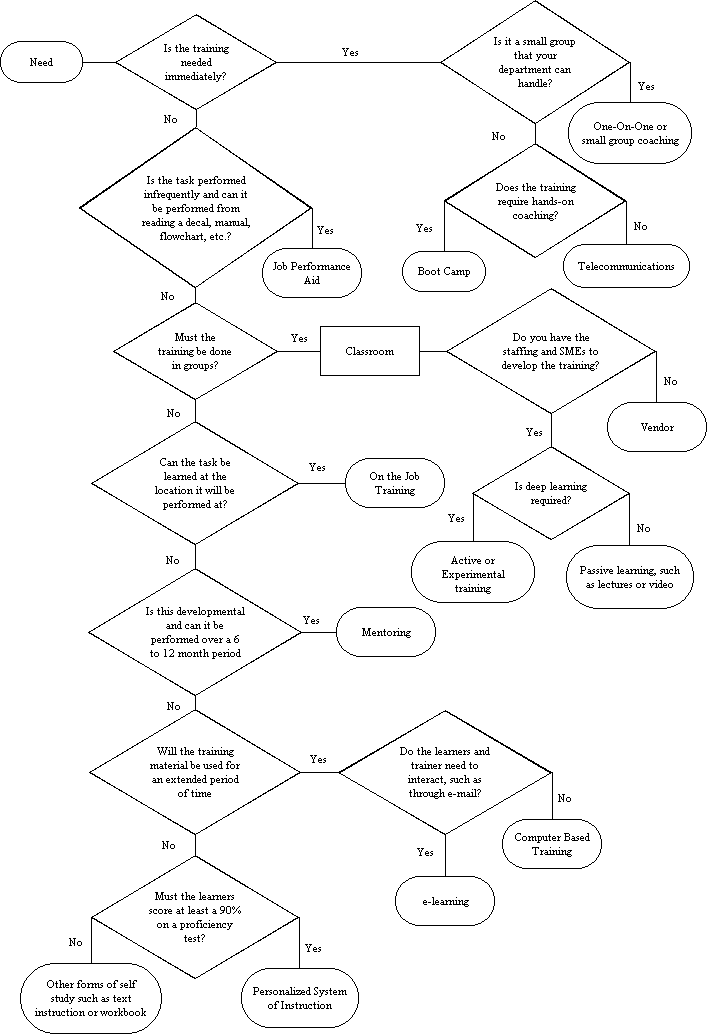
Click image to open larger image
The above Training Media Selection Flowchart is a tool to aid you in selecting the best medium for a training program. The flowchart should not be thought of as the final word in media selection, but rather a guide that shows the various options for communicating and transferring your learning objectives to others. It does not attempt to take it through every avenue of approach, as that would lead to a highly convoluted chart; but rather its goal is to lead you through the major media directions and choices in order to give you a few ideas.
When selecting media, you have to consider your learners' needs, resources, experience, and training goals. Also, do not take a complete training program through the chart, but rather each activity or module of your training program. The goal of a good training effort is to build a viable and efficient program, which normally means a blended learning solution. That is, it should provide the best learning environment at the lowest possible cost. Selecting the best medium for each module and incorporating it into your course allows you to build a Best-Of-Class (blended) program.
The guidelines for selecting the instructional setting are simple—you want the learners to master the new or existing technology in a professional, effective, and efficient manner.
Next Steps
Go to the next section: Estimating Training Time and Costs
Return to the Table of Contents
For a comprehensive list of media, go to the Media Dictionary
Analysis Templates (contains several analysis templates)
Pages in the Analysis Phase:
-
Choose Instructional Setting
References
Clark, R. (2001). Learning from Media: Arguments, Analysis, and Evidence. Greenwich, Connecticut: Information Age Publishing.
U.S. Army Field Artillery School (1984). A System Approach to Training. ST - 5K061FD92. Washington, DC: U.S. Government Printing Office.